SharePoint 15 ist angekündigt: http://flic.kr/p/bw7wEU.
isolutions ist bereits jetzt mit einem Kundenprojekt in der Schweiz live dabei (Technical Adoption Programm).
Weitere Infos gibts hier sobald gestattet.
Posts mit dem Label SharePoint werden angezeigt. Alle Posts anzeigen
Posts mit dem Label SharePoint werden angezeigt. Alle Posts anzeigen
12 April 2012


14 Dezember 2009
Workflow Designer Tipps und Tricks
Custom Activities sind cool: Sie erlauben, komplexe Teillogik eine Workflows in eine eigene Klasse / Activity zu packen, und dann den eigentlich Workflow schön schlank zu halten. Wenn nur nicht der Standard Workflow Designer im Visual Studio dann sämtliche Activities in der Custom Activity wieder anzeigt:

Das NERVT gewaltig. Jedenfalls mich persönlich. Zum Glück gibt es - wie für die meisten Probleme - dafür auch eine einfache Lösung: Einen Custom Designer per Attribut auf die Custom Activity setzen. Was jetzt kompliziert tönt, ist ganz einfach, da der Custom Designer nur deklariert werden muss, und gar keinen eigentlichen Code enthält.
    [Designer(typeof(MyDesigner), typeof(IDesigner))]
    public partial class HandleGroupReview : SequenceActivity
    {

        private class MyDesigner : ActivityDesigner { }

        // … A lot of workflow code …

    }
Anschliessend muss noch das Attribut “Designer” auf der Custom Activity Klasse gesetzt werden und der oben abgebildete Workflow sieht schon wieder viel aufgeräumter aus.

02 November 2009
How to set a Correlation Token Property on a Custom Activity
I like to break up my sharepoint workflows into several custom activities, especially when there are many repetitive tasks involved. But I've always struggeld with one thing: when I needed to send an email from such an activity, I had to pass the correlation token of the onWorkflowActivated activity manually in the constructor of my workflow to my custom activity, which assigned it in turn to the SendEmail activity. As one doesn't get workflow validation using this approach, it makes for an easy to oversee failure if in a hurry. And additionally, the compiler produces a warning that the correlation token of you SendEmail Activity may be uninitialized.
After a little digging around with Reflector.NET, I finally found out that one can declare a Type Converter of the type CorrelationTokenTypeConverter on the correlation token property of the custom activity. As this type converter is an internal class, the type property of the attribute has to be set by its full qualified class name.
[DefaultValue((string)null),
    TypeConverter("System.Workflow.Activities.CorrelationTokenTypeConverter, System.Workflow.Activities, Version=3.0.0.0, Culture=neutral, PublicKeyToken=31bf3856ad364e35")]
public CorrelationToken WorkflowCorrelationToken
{
    get { return (CorrelationToken)base.GetValue(WorkflowCorrelationTokenProperty); }
    set
    {
        base.SetValue(WorkflowCorrelationTokenProperty, value);
        sendEmail.CorrelationToken = value;
    }
}
(The code snippets above assumes assumes that a “CorrelationToken” dependency property is registered for the custom activity class.)
Now that we can set the correlation token using the designer, we are also able to use a validator class on the custom activity, so the compiler will throw an error if the correlation token is not set. Doing this is quite easy, just add the ActivityValidator attriubte to the activity class definition and implement an activityvalidator class which validates that the correlation token property of the custom activity is set.
[ActivityValidator(typeof(MyActivityValidator))]
public partial class MyActivity : SequenceActivity
{

    private class MyActivityValidator : ActivityValidator
    {
        /// <summary>
        /// Verifies that the MyActivity activity is valid.
        /// </summary>
        /// <param name="manager">The <see cref="T:System.Workflow.ComponentModel.Compiler.ValidationManager"/> associated with validation.</param>
        /// <param name="obj">The <see cref="T:System.Workflow.ComponentModel.Activity"/> to be validated.</param>
        /// <returns>
        /// A <see cref="T:System.Workflow.ComponentModel.Compiler.ValidationErrorCollection"/> object containing any errors or warnings that occurred during validation.
        /// </returns>
        public override ValidationErrorCollection Validate(ValidationManager manager, object obj)
        {
            ValidationErrorCollection errors = new ValidationErrorCollection();
            MyActivity activity = obj as MyActivity;
            if (activity == null)
            {
                throw new InvalidOperationException();
            }
            if (activity.Parent != null)
            {
                if (activity.WorkflowCorrelationToken == null)
                {
                    Hashtable hashtable = activity.GetValue(WorkflowMarkupSerializer.ClrNamespacesProperty) as Hashtable;
                    if ((hashtable == null)  (hashtable["WorkflowCorrelationToken"] == null))
                    {
                        errors.Add(ValidationError.GetNotSetValidationError("WorkflowCorrelationToken"));
                    }
                }
            }
            errors.AddRange(base.Validate(manager, obj));
            return errors;
            }
    }
    // SNIP: MyActivity code...
}
24 Oktober 2009
SharePoint 2010 – ein Fazit
Die SharePoint Conference ist zu Ende. Ein guter Zeitpunkt also für ein kurzes Resumé.
Nach vier Tagen mit insgesamt 240 Sessions liesse sich zu all den Neuerungen, den damit verbundenen Möglichkeiten und dem daraus resultierenden Nutzen mindestens ein Buch schreiben. Doch Steve Ballmer, Microsoft’s CEO, hat SharePoint 2010 wie folgt zusammengefasst:
SharePoint ist die Business Collaboration Plattform für Unternehmen und hat, stark vereinfacht die drei folgenden, nutzenstiftenden Vorteile:
- SharePoint verbindet Mitarbeiter in Ihrem Unternehmen und hilft ihnen dabei, produktiv zu sein.
- SharePoint reduziert Ihre Betriebskosten durch eine zentrale und einheitliche Infrastruktur.
- Und SharePoint ermöglicht es, mit der Version 2010 mehr denn jemals zuvor, auf Anforderungen und Bedürfnisse des Business rasch treffende Antworten zu liefern.

Dieser treffenden Beschreibung wurde in den Sessions der vergangenen Tage ganz konkret Form verliehen:
- Administration, Entwicklung und Anpassung von SharePoint an Geschäftsanforderungen sind einfacher und schneller geworden.
- Die Komplettheit der Plattform hinsichtlich der adressierten Themen ist äussert umfassend. So ist Microsoft mit Enterprise Search heute bereits im Leading Quadranten, mit ECM und Collaboration mit grossen Schritten auf dem Weg dahin.
- Natürlich gibt es immer noch Themen, wo spezialisierte und fokussierte Produkte weitergehen. Doch im Zusammenspiel ist SharePoint unschlagbar. Dies ist inbesondere deshalb von Bedeutung, als dass viele Themen immer stärker zusammenwachsen und nicht mehr isoliert betrachtet werden können.
Unter dem Strich werden viele der bereits seit längerem proklamierten Marketing-Statements und Versprechungen mit der neuen Version endlich Realiät. Einiges wurde in den Blogposts der vergangenen Tage breits beschreiben und ausgeführt, vieles werden wir in den kommenden Monaten und Jahren erfolgreich in den Geschäftsalltag transformieren können.
Eine interessante und herausfordernde Aufgabe, für die mit der Version 2010 von Office und SharePoint eine ausgereifte und bereits tausendfach eingesetzte Plattform zur Verfügung steht. Bisher werden von den weltweit rund 100 Millionen verkauften 2007er Lizenzen nur ein Bruchteil wirklich eingesetzt. Zeit also, den brachliegenden Nutzen freizusetzen.
Und so kann als abschliessendes Fazit gesagt werden: die gemachten Aussagen treffen vollumfänglich zu. Den Nachweis werden wir erbringen können.
21 Oktober 2009
SharePoint Conference – Day 1 & 2
Der zweite Tag ist durch und ich bin es auch. Kühlschrankartige Temperaturen, endlose Teppichböden, Kunstlicht und seit zwei Tagen keinen Schritt an der frische Luft haben ihre Spuren hinterlassen – zum Glück findet heute Abend die Pool Party am Mandalay Beach statt, da werden die Batterien wieder geladen…
Nun aber zu den wichtigsten bisher rausgeschälten Neuerungen von SharePoint und Office 2010: es sind deren viele! Darum an dieser Stelle eine ausgewählte Essenz:
Services – und wie sie uns dienen werden…
SharePoint 2010 wartet mit einer ganzen Serie von neuen Office Client Services auf. Die bereits bekannten Excel Servcies haben mit den Word, PowerPoint, Visio und Access Services massiven Zuwachs bekommen. Diese Services ermöglichen die webbasierte Darstellung und (limitierte) Bearbeitung der entsprechenden Dokumente, eine Client-Installation ist also nicht mehr in jedem Fall zwingend notwendig. Die Beareitung ist allerdings limitiert auf eine beschränkte Menge der in den Client-Versionen zur Verfügung stehenden Möglichkeiten, reicht für den täglichen Einsatz wohl trotzdem relativ weit.
Es dürfte künfitg also durchaus Szenarien geben, wo die Installation der Office Suite für gewisse Benutzer oder Geräte nicht mehr notwendig sein wird, wodurch sich Lizenzkosten optimieren und einsparen lassen Des weitern wird all den Amazonas-Internet-Café-Besuchern beim Betreten des als Internet-Café deklarierten Raums ein entspanntes Lächeln über das Gesicht huschen. Das ist doch echte Freiheit!
Aus all den Services sind mir zwei besonders aufgefallen: Visio und Access Services.
Visio Services ermöglichen, einfacher als je zuvor, die Visualisierung von Visio Zeichnungen angereichert mit Live-Daten. Ob Produktionsprozesse, Sales-Team Performance oder Produktabsatz pro Region, solche eher trockenen Auswertungen lassen sich sehr rasch und einfach visuell ansprechend aufbereitet darstellen.
Die Access Services bieten vor allem für Unternehmen, die viele Access Datenbanken in Betrieb haben, eine erfolgsversprechende Zukunft. Access Datenbanken können damit in SharePoint überführt werden und erhalten so eine gesicherte Existenz, fernab der chaotischen und SLA losen Zustände. Auf jeden Fall ein ganz heisses Thema!
Zusammengefasst bieten Office und SharePoint 2010 mit den neu verfügbaren Servcies grossen Mehrwert für eine breite Benutzerbasis und werden auch eine direkte Betriebskostenreduktion ermöglichen.
Co-Authoring – echte Zusammenarbeit wird endlich möglich…
Lange haben wir darauf gewartet! Und genausolange auch darunter gelitten, dass es nicht möglich war: das gleichzeitige Bearbeiten ein und desselben Dokuments, genannt Co-Authoring.
Wer kennt das Szenario nicht. Es soll beispielsweise eine Offerte erstellt werden, an deren Inhalt verschiedene Personen arbeiten. Nun erstellt jeder für sich, optimalerweise noch lokal auf seinem Gerät, ein Arbeitsdokument, wo er seine Inhalte erfasst. Zu einem gewissen Zeitpunkt werden die Dokumente schliesslich in ein einziges Dokument – die Offerte – zusammengeführt. Eine mühsame, aufwändige und fehleranfällige Arbeit, die schon manche Nacht als Tribut gefordert hat.
Dies hat nun ein Ende. Co-Authoring steht in Word, Excel und PowerPoint 2010 zur Verfügung und funktioniert so einfach, dass man zuerst gar nicht realisiert, was wirklich geschieht. Öffnet ein Benutzer ein Dokument, das bereits durch einen anderen Benutzer bearbeitet wird, dann wird automatisch der Co-Authoring Modus aktiviert. In der Statuszeile sieht man dann, wie viele und welche Benutzer zur Zeit das Dokument bearbeiten und kann mit diesen auch gleich mittels EMail oder Instant Messaging in Kontakt treten. Die Beareitung selbst erfolgt auf Absatzbasis und das Dokument wird jeweils beim Speichern mit den neuesten verfügbaren Änderungen der anderen Benutzer aktualisiert. Klingt einfach – ist es auch!
Co-Authoring wird unsere künftige Zusammenarbeit in Dokumenten daramatisch vereinfachen. Für Excel wird Co-Authoring sogar mit den Excel Services webbasiert möglich sein, erfordert also nicht einmal einen installierten Client. Der Amazonas-Internet-Café-Besucher lässt freudig grüssen…
Document-Sets und Enterprise Ready ECM
Auch im Bereich ECM hat sich mit SharePoint 2010 einiges getan. Zusammengefasst darf mit ruhigem Gewissen gesagt werden, dass SharePoint in dieser Domäne endlich erwachsen geworden ist.
Eine Vielzahl von Neuerungen, unter anderem in den Bereichen Metadatenverwaltung, Taxonomie, Compliance, Records Management und Dokument-Handling (Pascal wird dazu wohl noch mehr berichten) machen SharePoint 2010 erstmals ohne Ergänzung mit Drittprodukten zu einer Enterprise Ready ECM Lösung.
Eine sehr interessante Funktion sei an dieser Stelle herausgegriffen: Document Sets. Diese ermöglichen es, Dokumente in einer Art Dossier zusammenzufassen und das Dossier als eigene Entität zu handhaben. So kann das Document-Set als ganzes beispielsweise im Rahmen eines Geschäftsprozesses freigegeben oder archiviert werden. Das Document-Set bzw. Dossier selbst hat dabei auch definierbare Metadaten und kann dem Benutzer erweiterte, Kontext-abhängige Informationen zur Verfügung stellen.
Dies eröffnet ganz neue Möglichkeiten in der Verwendung von SharePoint, ohne dass dazu aufwändige und inkonsistente Erweiterungen vorgenommen oder Drittprodukte installiert werden müssen.
05 Oktober 2009
SharePoint Seitenelemente verstecken

- Logo oder Titel
- Suchbereich
- Left- oder Globalnavigation
- View All Site Content
- Recycle Bin
Das generierte CSS kann mittels Content Editor Web Part oder über einen Custom Master eingebunden werden.
02 Oktober 2009
Fix Variations Editor
Variations sind ein tolles Konzept um mehrsprachige SharePoint Websites (WCM Sites) zu realisieren. Variations vereinfachen den Publikationsprozess und stellen die Relation zwischen den einzelnen Seiten in den verschiedenen Sprachen (Variation Labels) sicher. Die Relation zwischen den einzelnen Seiten wir in einer hidden List im Site Collection Root abgelegt.
Teilweise werden diese Einträge bei Änderungen an den Seiten z.B. umbenennen einer Seite nicht korrekt aktualisiert und es entstehen Inkonsistenzen zwischen den einzelnen Sprachvariationen der Seiten.
Auf dem Markt gibt es verschiedene Tools um solche Probleme zu lösen, doch heute habe ich meinen Favoriten entdeckt. Das Tool nennt sich Variations Editor und kann bei der SharePoint User Group gratis heruntergeladen werden. Das Tool zeigt nach einem Scan alle Fehler innerhalb einer Site Collection an und ermöglicht auf eine einfache Art die Korrektur der Fehler.
Download Variations Editor

Teilweise werden diese Einträge bei Änderungen an den Seiten z.B. umbenennen einer Seite nicht korrekt aktualisiert und es entstehen Inkonsistenzen zwischen den einzelnen Sprachvariationen der Seiten.
Auf dem Markt gibt es verschiedene Tools um solche Probleme zu lösen, doch heute habe ich meinen Favoriten entdeckt. Das Tool nennt sich Variations Editor und kann bei der SharePoint User Group gratis heruntergeladen werden. Das Tool zeigt nach einem Scan alle Fehler innerhalb einer Site Collection an und ermöglicht auf eine einfache Art die Korrektur der Fehler.
Download Variations Editor
07 September 2009
Workflowtasks mit automatischen Erinnerungen

SharePoint Workflows bieten relativ einfach die Möglichkeit, an verschiedenen Personen Tasks zuzuweisen, welche diese dann abarbeiten. In der Theorie mag sich das zwar gut anhören, in der Praxis werden diese Tasks einfach ignoriert und der Workflow kommt zum Stillstand ("Nööö, ich hab' nie einen Task zugewiesen gekriegt? Ach das E-Mail? Das hab' ich gelöscht…).
Eine Lösung dazu ist simpel: In periodischen Abständen wird dem Benutzer automatisch ein Reminder gesendet. Hört sich auch noch einfach an, gell? Links der Workflow ohne Erinnerungen:
Ein einfacher Approval Workflow also. Wir nehmen mal einfach so an, dass der Genehmigungstask ein Custom Form besitzt, wo der Benutzer zwei Buttons «Genehmigen» und «Ablehnen» hat. Im onApprovalTaskChanged.Invoked Event wird abgefragt, welcher Button geklickt wurde und doSomething führt die entsprechende Aktion aus.
 Falls wir einen Timeout einbauen möchten, müssen wir auf ein zweites Event warten die Delay Activity um anschliessend den Reminder zu senden. Glücklicherweise gibt's in der Windows Workflow Foundation die Listen Activity, welche es ermöglicht, auf mehrere Events gleichzeitig zu warten. Diese Activity blockiert den Workflow bis einer der angegebenen Events eintritt.
Dort packen wir in einen Ast die OnTaskChanged Activity und in den Anderen eine Delay Activity und eine SendEmail Activity. Da der Reminder nicht nur einmal gesendet werden soll, gibt's noch eine while Schlaufe drumherum.
Vergesst nicht, die Correlation Tokens richtig zusetzten: Es gibt zwei Tokens, eines für die onWorkflowActivated und sendReminder Activities und ein Anderes für die createApprovalTask und onApprovalTaskChanged Activities.
Gut zu wissen: Die Delay Activity wird vom SharePoint Timer Service abgearbeitet. Um sicherzugehen, dass das korrekte Assembly geladen wurde, muss also nach einem Deployment in den GAC auch der Server SPTimerV3 neu gestartet werden. Um zu Debuggen, muss der Prozess OWSTimer.exe attached werden.
21 Juni 2009
SharePoint Search Offline / Migration of Database Server
After migration of all SharePoint Databases to a new Server SharePoint Search isn't working anymore. If you access the Search Setting Page of your SSP it gives you the following Error:
The search service is currently offline. Visit the Services on Server page in SharePoint Central Administration to verify whether the service is enabled. This might also be because an indexer move is in progress.
All my Search Services (WSS Search / MOSS Search) were started successfully, but I still got the error.
I tried the following with no success:
The only thing that solved the Problem was the Upgrade to SP 2. Before I had SP1 and Infrastructure Updates installed. Don't waste your time - just upgrade!
The search service is currently offline. Visit the Services on Server page in SharePoint Central Administration to verify whether the service is enabled. This might also be because an indexer move is in progress.
All my Search Services (WSS Search / MOSS Search) were started successfully, but I still got the error.
I tried the following with no success:
- Deleted and rebuilt SSP
- Disconnected / reconnected the Server from the Farm
- Repaired SharePoint Installation
- Checked launch Component Permissions on OSearch COM Component
- Rebuilt whole Farm
The only thing that solved the Problem was the Upgrade to SP 2. Before I had SP1 and Infrastructure Updates installed. Don't waste your time - just upgrade!
29 April 2009
Display SharePoint Metadata in Word 2003
Yes, there are still customers who use Office 2003 in combination with SharePoint 2007...
So i had to find a generic solution do display SharePoint Metadata in Word 2003 templates. I found different solutions to achieve this, but none of them solved all my Problems. The most common Problem ist the update of your Fields at the right time.
Basics / Limitations:
Save your Template and create your first Document from this Template, enjoy the Interopability from SharePoint 2007 and Office 2003. ;-)
So i had to find a generic solution do display SharePoint Metadata in Word 2003 templates. I found different solutions to achieve this, but none of them solved all my Problems. The most common Problem ist the update of your Fields at the right time.
Basics / Limitations:
- SharePoint Metadata is mapped into Word 2003 over Document Properties
- Only Fields of Type "Text" can be mapped (If you need to display Values of other Fields than Type Text, you need to add a Textfield to your Content Type and use a Eventhandler to Copy the Value of your desired Field to the Textfield and map this as Doument Property to your Word Template. A common case could be "Version" or Author of a Document, which are OOB no Textfields)
- OOB Document Properties are updated on Print only (This is a Word Option which is set by Default)
How to: - Bind your Word Template to corresponding ContentType of the DocLib
- Add the following Code, which updates the Fields when the Document opens, as Macro (Macro on the current Document, not as Module) to your Word Template:
Private Sub Document_New()
ActiveDocument.Fields.Update
End Sub
Private Sub Document_Open()
ActiveDocument.Fields.Update
Dim oStory As Object
Dim oToc As Object
'exit if no document is open
If Documents.Count = 0 Then Exit Sub
Application.ScreenUpdating = False
For Each oStory In ActiveDocument.StoryRanges
oStory.Fields.Update 'update fields in all stories
Next oStory
For Each oToc In ActiveDocument.TablesOfContents
oToc.Update 'update TOC's
Next oToc
Application.ScreenUpdating = True
End Sub
Private Sub Document_Close()
ActiveDocument.Fields.Update
End Sub
Private Sub Document_Sync(ByVal SyncEventType As Office.MsoSyncEventType)
End Sub
This Code updates all Sections of the Document including Header and Footer, not just the Content Section.
Save your Template and create your first Document from this Template, enjoy the Interopability from SharePoint 2007 and Office 2003. ;-)
02 Dezember 2008
SharePoint + jQuery
jQuery ist ein Open Source AJAX Framework, welches auf einem schmalen Footprint basiert und eine grosse Community dahintersteht, welche viele Plug-Ins bereitstellt. jQuery kann man schnell und einfach mittels JavaScript das HTML Dokument traversieren. Für SharePoint (und ASP.NET) Entwickler ist jQuery spannend, weil Microsoft jQuery offiziell unterstützt und z.B. IntelliSense Support in Visual Studio 2010 einbauen wird.
Jan Tielens hat auf seinem Blog ein nettes Beispiel den Einsatz von jQuery als Ersatz für die TopNavigation unter SharePoint.
Heute hat er nun in seinem Blog weitere Anweisungen gepostet und dazu den Code auf CodePlex zur Verfügung gestellt. Seine Lösung teilt sich in zwei Solutions auf:
- jQuery for SharePoint 2007 fügt mittels eines DelegateControl einen Link im Seitenheader auf das jQuery Framework hinzu. Sehr elegant gelöst und auch für eigene Projekte geeignet.
- Im WSP DockNavigationSetup wird das jDock Plug In mitgeliefert sowie DelegateControls und Assembly, welche die Navigation verändern.
Macht dies nicht Lust auf mehr? Sobald ich Zeit habe, werde ich mit jQuery herumexperimentiert und meine Erfahrungen hier posten.
25 November 2008
SharePointReviews.com: Unhängige Reviews von SharePoint Erweiterungen
Mit SharePointReviews.com gibt es endlich ein Produkt Verzeichnis, welches die vielen SharePoint Erweiterungen auflistet und kurz beschreibt. Neben Webparts findet man in diesem Verzeichnis auch Tools für die Administration und Migration sowie z.B. Offline Clients.
Gelistet werden neben Bezahl Software (welche direkt gekauft werden kann) auch Open Source Erweiterungen. Alles versenden mit Ratings und Kommentaren. Toll Sache!
30 Oktober 2008
SharePoint Custom Site Definition Battle
Joel Oleson hat in seinem Blog einen Krieg losgetreten: den SharePoint Custom Site Definition Battle. Die Reaktionen hat er u.a. hier zusammengefasst. Er sieht berechtigte Risiken in der Upgradefähigkeit von Site Definitions und wollte deren Verwendung unter Bann stellen. Die Reaktionen waren heftig. Doch hat sich ein konstruktiver Dialog ergeben, welcher ich hier kurz wiedergeben möchte.
Alternativen
Auf die Alternativen zu Site Definitions möchte ich nur kurz eingehen, da es im SharePoint kein anderes Konstrukt gibt, mit einem Klick eine Site ab einer bestimmten Vorlage zu erstellen.
So decken z.B. Site Templates (STP Dateien) nur ca. 80% der Funktionen ab. Die restlichen 20% müssten entweder geklickt oder programmiert werden. Weder das eine noch das andere lässt aber das Herz des SharePoint Architekten höher schlagen. Wenn ab
Funktionalität
Zu SharePoint 2003/WSS v2-Zeiten standen uns bis auf Site Definitions keine anderen Möglichkeiten zur Verfügung Vorlagen für Listen, Sites, etc. abzulegen. Mit SharePoint 200//WSS v3 basieren die Site Defintions auf Features, welche das Gros der Customizations beinhalten.
Wenn Customizations (Listen Vorlagen, Listen, Content Types, etc.) in Features ausgelagert und diese an eine Custom Site Defintion gestampelt werden, spricht nichts gegen Custom Site Definitions. Falsch wäre es aber heute Site Definition auf die "alte Art" zu erstellen und alles ins ONET.XML zu packen.
Um die eigenen Features aber mit einer Site Definitions zu verbinden (Stampling), kommen wir nicht darum herum eigene Site Definitions zu erstellen.
Upgradefähigkeit
Wurde eine Site ab einer Site Definition erstellt, bleibt sie auf immer mit dieser verbunden. Da gibt es keinen Weg heraus. Niemand weiss, wie das Upgrade von SharePoint 2007 auf SharePoint v.Next in Bezug auf die Site Definitions aussehen wird. Man munkelt, dass SharePoint v.Next keine Site Definitions mehr unterstützen wird. Trotzdem wird uns Microsoft einen Weg zur Verfügung stellen, wenigstens jene Sites zu migrieren, welche ab OOB Site Definitions erstellt wurden.
Sind die eigenen Site Definitions nun bis auf die ID identisch mit den OOB Site Definitions, sollte ein Upgrade uns nicht vor grosse Probleme stellen. Dadurch, dass wir aber eine eigene ID haben, können wir unsere Features mit unserer Site Definitions verbinden.
Quintessenz
- Erstelle eine Custom Site Definitions, wenn es notwendig ist. Auch wenn es nur darum geht, eine Site Definition mit einer eigene ID in der Hand zu halten, auf welche die Features gestapelt werden.
- Wenn du eine Custom Site Definition erstellst, beschränk dich auf das Minimum und bleib nahe bei den OOB Site Definitions. Alles was mittels Features gelöst werden kann, soll mittels Feautres gelöst werden.
Euer Kommentar ist herzlich willkommen. David Schneider
07 Juli 2008
Language filter with Faceted Search
SharePoint Search extracts the language of a document during the crawl and use this information for the calculation of the relevancy while generating search results.
This behavior cause problems in multilingual enterprises. SharePoint search returns mainly documents in the user language (respectively the browser language).
Based on a post from Patrick Tisseghem about a hidden managed property which contains the language of a document. This managed property is called "DetectedLanguage". As Patrick mentioned, the language is stored as an integer value (9 = English, 7 = German, etc.). It could be used on your SharePoint out of the box (give it a try and search for "somekeyword deletectedlanguage:9").
But the real power of this managed property is developed in conjunction with Faceted Search. This open source SharePoint extensions allows you to use SharePoint meta data (or Managed Properties) as facets to refine your search. Go to the CodePlex project page and have a look at there web casts for more information.
 You can extend Faceted Search to use your own managed properies as facets. In this way, you also can use the "detectedlanguage" property. Just paste to following XML snipped in the property "Select columns for Facets" in the "Search Facets" Web Part. With this, you will be able to restrict your search results based on the lanuage of a document.
As a side effect, you will see, that SharePoint (or the underlining IFilter) does lots of errors while detecting the language of a document.
Here is the XML snipped for the Faceted Search Web Part configuration:
This behavior cause problems in multilingual enterprises. SharePoint search returns mainly documents in the user language (respectively the browser language).
Based on a post from Patrick Tisseghem about a hidden managed property which contains the language of a document. This managed property is called "DetectedLanguage". As Patrick mentioned, the language is stored as an integer value (9 = English, 7 = German, etc.). It could be used on your SharePoint out of the box (give it a try and search for "somekeyword deletectedlanguage:9").
But the real power of this managed property is developed in conjunction with Faceted Search. This open source SharePoint extensions allows you to use SharePoint meta data (or Managed Properties) as facets to refine your search. Go to the CodePlex project page and have a look at there web casts for more information.
 You can extend Faceted Search to use your own managed properies as facets. In this way, you also can use the "detectedlanguage" property. Just paste to following XML snipped in the property "Select columns for Facets" in the "Search Facets" Web Part. With this, you will be able to restrict your search results based on the lanuage of a document.
As a side effect, you will see, that SharePoint (or the underlining IFilter) does lots of errors while detecting the language of a document.
Here is the XML snipped for the Faceted Search Web Part configuration:
23 Juni 2008
Update Content Type with a Feature
If you deploy your Content Types with a Feature, you will run into a problem, when you would like to modify the Content Type. If you modify and redeploy the Feature, then the Site Content Type is disconnected from the List Content Type. This is because very time a Content Type is assigned to a list, a new List Content Type is created, which inherits from the Site Content Type.
If you do the modification manually you should always modify the Site Content Type. While doing via Site Settings, you have an option which force SharePoint to propagate the modification to all the List Content Types inherited from the Site Content Type.
But when you do the modification by changing the Feature, then SharePoint won't update the inherited List Content Types. There are some STSADM extensions which do this work for you (i.e. from Gary Lapointe or Søren Nielsen).
I took the Code from Søren Nielsen and put it in a FeatureActivated Event Handler. In my Content Type Feature.xml I set the ReceiverAssembly and ReceiverClass attribute. This allows you the modify the Content Type in the Feature, upgrade the WSP, deactive and finally reactive the Feature. Reactivating the Feature will change the Site Content Type. SharePoint will propagate the modification with the FeatureActivated Event Handler to all the List Content Types inherited from the Site Content Type.
If you just add some Site Columns to your Site Content Type (or delete some unused Columns), this would make your deployment and change management process much more easier. Perhaps almost as easy as the good old ALTER TABLE SQL scripts ;)
Here is the my Code. Just copy the ProcessWeb() and all the other method from Søren Nielsen's blog.
If you do the modification manually you should always modify the Site Content Type. While doing via Site Settings, you have an option which force SharePoint to propagate the modification to all the List Content Types inherited from the Site Content Type.
But when you do the modification by changing the Feature, then SharePoint won't update the inherited List Content Types. There are some STSADM extensions which do this work for you (i.e. from Gary Lapointe or Søren Nielsen).
I took the Code from Søren Nielsen and put it in a FeatureActivated Event Handler. In my Content Type Feature.xml I set the ReceiverAssembly and ReceiverClass attribute. This allows you the modify the Content Type in the Feature, upgrade the WSP, deactive and finally reactive the Feature. Reactivating the Feature will change the Site Content Type. SharePoint will propagate the modification with the FeatureActivated Event Handler to all the List Content Types inherited from the Site Content Type.
If you just add some Site Columns to your Site Content Type (or delete some unused Columns), this would make your deployment and change management process much more easier. Perhaps almost as easy as the good old ALTER TABLE SQL scripts ;)
Here is the my Code. Just copy the ProcessWeb() and all the other method from Søren Nielsen's blog.
03 Juni 2008
Object Required Error – Drag & Drop of Web Parts
Some days ago one of my MOSS 2007 WCM sites faced up with an "Object Required" Java Script error while a content editor tried to drag & drop a Web Part in a custom Web Part Zone. Usually this sets the index of the Web Part in this Zone.
All right.. I tried to debug the problem with Visual Studio. The Debugger gave me the information about a missing offset in function “MSOLayout_GetRealOffset”, but I wasn't able to figure out what the reason for this behavior could be. After the provisioning of a new Site with the Standard Master Pages and Style Sheets applied, the error didn’t appear anymore. This means that it had something to do with my custom Styles I applied.
Step by step I reapplied my CSS and discovered that the error only appears when I apply the custom styles for my WebPart Zone Holder Divs.
In my CSS I had defined the property: “position: relative”, which caused the error.

You should use no other position definitions than “position: static”. This is the only way it works.

Drag & Drop anyway just works in Internet Explorer, but to miss this functionality is indeed not user friendly.
All right.. I tried to debug the problem with Visual Studio. The Debugger gave me the information about a missing offset in function “MSOLayout_GetRealOffset”, but I wasn't able to figure out what the reason for this behavior could be. After the provisioning of a new Site with the Standard Master Pages and Style Sheets applied, the error didn’t appear anymore. This means that it had something to do with my custom Styles I applied.
Step by step I reapplied my CSS and discovered that the error only appears when I apply the custom styles for my WebPart Zone Holder Divs.
In my CSS I had defined the property: “position: relative”, which caused the error.

You should use no other position definitions than “position: static”. This is the only way it works.

Drag & Drop anyway just works in Internet Explorer, but to miss this functionality is indeed not user friendly.
30 Mai 2008
Display Profile Properties in Table Style
I would like to show you, how you can display profile properties in a table. For example this would allow you to generate a telephone directory from your profile data.
Briefly this would be done in two steps: indexing your profile properties and displaying them with a People Results Web Part.
Let's start creating a managed property. Every property you would like to display on the list, must be crawled by the index and mapped to a managed property.
Creating a managed property
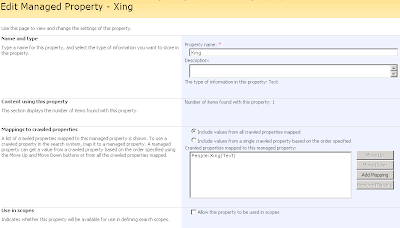
Sample with the managed property "Xing" which is mapped to the crawled propery "Xing".
Bringing the properties to the screen
Of course you could write a Web Part which iterates over the profiles and then render the data in a gridview. But you can also do this by configuration with the People Search Core Results Web Part.
Here is a sample XSL which display the name, the e-mail and a like to a Xing profile.
Briefly this would be done in two steps: indexing your profile properties and displaying them with a People Results Web Part.
Let's start creating a managed property. Every property you would like to display on the list, must be crawled by the index and mapped to a managed property.
Creating a managed property
- On the SSP admin site, go to the "User profile and property" page, select "View Profile Properties" and select the profile property, you want to display. You could also create new properties.
- Make sure that the checkbox "Indexed" is selected.
- Repeat this set for every property.
- Do a full crawl of the SSP/MySite content source (usually the "Local Office SharePoint Server sites")... and wait until it is completed.
- Now you can create managed properties. For this, go to "Search Settings" and choose "Metadata property mappings".
- First check, if your desired property is no all ready managed. If not, create a new managed property and add a mapping to the crawled property.
- Again start a full crawl.

Sample with the managed property "Xing" which is mapped to the crawled propery "Xing".
Bringing the properties to the screen
Of course you could write a Web Part which iterates over the profiles and then render the data in a gridview. But you can also do this by configuration with the People Search Core Results Web Part.
- To begin, you have to create a new Web Part Page and add the "People Search Core Result s".
- In the Web Part Properties you set a "Fixed Keyword Query" and select a Cross-Web Part Query ID different from "user query". As "Fixed Keyword Query" you could enter contentclass:"SPSPeople" to display all profiles. But you can also define a custom query, which matches only to a parts of the profiles in your Shared Service Provider.

- Under "Selected Columns" add a line for every Managed Property. Check first, if it's not allready there. In our sample, I added <column name="Skills"> before the closing </columns> tag.
- Now we have to edit the XSL. If you are a native XSL speaker like my fellow worker Dänu, you can start creating your XSL and can stop reading here.

- If not, here some tricks how this could be done. I would suggest, that you copy the existing XSL. This XSL could be used later as a starting point.
- With the following XSL you can output the XML code of the search resutls.
<?xml version="1.0" encoding="utf-8"?>
<xsl:stylesheet version="1.0" xmlns:xsl="http://www.w3.org/1999/XSL/Transform">
<xsl:template match="@* | node()">
<xsl:copy>
  <xsl:apply-templates select="@*|node()" />
</xsl:copy>
</xsl:template>
</xsl:stylesheet>
Copy & Paste it in to the XSL editor field and hit "Apply". - Now you have to look at the HTML source code. Search for
and copy the hole tag (until the closing ) to the clipboard. In this XML you will see all the properties returned by SharePoint. - If you are familiar with Visual Studio 2008 you could use it to generate a new XSL. Save the XML output to a file und try to run the XSL against that file (Menu: XML \ Show XSLT Output).


Here is a sample XSL which display the name, the e-mail and a like to a Xing profile.
<xsl:stylesheet version="1.0" xmlns:xsl="http://www.w3.org/1999/XSL/Transform" >
<!-- XSL transformation starts here -->
<xsl:template match="/">
<table>
<tr>
<td>Name</td>
<td>Email</td>
<td>Xing</td>
</tr>
<xsl:apply-templates />
</table>
</xsl:template>
<!-- This template is called for each result -->
<xsl:template match="All_Results/Result">
<xsl:variable name="id" select="id"/>
<xsl:variable name="url" select="url"/>
<tr>
<td>
<a href="{$url}" id="{concat('CSR_',$id)}">
<xsl:value-of select="preferredname"/>
</a>
</td>
<td>
<xsl:value-of select="workemail"/>
</td>
<td>
<xsl:if test='string-length(xing) > 0'>
<a href="{xing}" id="{concat('XING_',$id)}">
<xsl:value-of select="xing"/>
</a>
</xsl:if>
</td>
</tr>
</xsl:template>
</xsl:stylesheet>
28 März 2008
WCM Approval Configrator
Today I wrote a small application which will allow you to set some of the approval workflow settings on a per-site base. This apps will modifiy the workflow association for you on every "Pages" library in the selected sites.
 You have the possibility to enable or disable the approval workflow, choose the participants of the workflow and allow or disallow to change the participants lists on workflow start.
I created this application to configure the approval workflow on a customer site. If you want you can download and extend the source code. You will see, that the association data is stored in a XML and with a little debugging you will be able to also modify the other parameters.
Here you can download the application including source code and Visual Studio 2008 project.
Update 10/17/2008: I moved the code to an ASPX, packed as WSP and uploaded to CodePlex. You can find the download on the MOSSApprovalConfig project site.
 You have the possibility to enable or disable the approval workflow, choose the participants of the workflow and allow or disallow to change the participants lists on workflow start.
I created this application to configure the approval workflow on a customer site. If you want you can download and extend the source code. You will see, that the association data is stored in a XML and with a little debugging you will be able to also modify the other parameters.
Here you can download the application including source code and Visual Studio 2008 project.
Update 10/17/2008: I moved the code to an ASPX, packed as WSP and uploaded to CodePlex. You can find the download on the MOSSApprovalConfig project site.
24 März 2008
how to: avoid loading “name.dll” active X component in anonymous WCM scenarios
just imagine.. after hard weeks of SharePoint development you configure your anonymous authentication provider to publish your web app anonymously to the internet. After you first browse your site, it wants to install an active x component named "name.dll". this component is loaded by core.js. The component then tries to fetch the availability information of Microsoft Office Communicator. I don't think your anonymous users will use this functionality. ;-)
Let's have a look at the problem:
In case of performance optimization you should never load core.js in anonymous WCM scenarios. SharePoint also tries to load other unnecessary stuff.
A nice way to avoid this is the MossCleanup HTTP Filter. Information on how to implement this: http://www.ie-soft.de/blog/PermaLink,guid,968b0588-f306-467b-be51-54f7a8f2079d.aspx
Fallback: If you need the core.js for any reason, just add this piece of javascript to your masterpage and "name.dll" wont be loaded anymore.
<!-- Avoid calling name.dll ActiveX -->
<script language="javascript" type="text/javascript">
function ProcessImn(){}
</script>
28 Dezember 2007
Get or set the content type of a list item programmatically
Keith asked my last week, how you can get the content type of a list item. It's quite easy:
First you have the get the Guid of the field "ContentType". With this Guid you can access the properties bag of an instance of a SPListItem. There the content type is stored as a string.
First you have the get the Guid of the field "ContentType". With this Guid you can access the properties bag of an instance of a SPListItem. There the content type is stored as a string.
SPListItem item = ...
Guid fieldGuid = item.Fields.GetFieldByInternalName("ContentType").Id;
item[fieldGuid] = "Document";
item.Update();
Abonnieren
Posts (Atom)